是什么
BCF(Block Formatting Contexts) 是元素的一个属性,满足一定条件的元素可以产生并拥有这样一个属性,这个属性会影响该元素的在网页中的表现及与其他元素的关系。
产生条件
根据w3c的定义,满足以下条件的元素则会产生BCF:
- 浮动元素,float 除 none 以外的值
- 绝对定位元素,position(absolute,fixed)
- display 为以下其中之一的值 inline-blocks, table-cells, and table-captions(包括w3c中没有提到的flex和inline-flex)
- overflow 不为 visible 以外的值(hidden,auto,scroll)
阻止外边距折叠
之前写了一篇collapse-margin的博客,其中大致说明外边距折叠的来历。但是漏掉了兄弟间元素产生collapse-margin的前提条件,即它们必须处于同一个BFC内。
故解决兄弟间元素发生外边距折叠的方法即给其中一个加个父元素,然后使之产生BCF(满足上面提到的产生条件即可),这样他么就不是兄弟元素了,而且不处于同一个BCF下,也就阻止了外边距折叠,demo如下
包裹浮动的元素
In a block formatting context, each box’s left outer edge touches the left edge of the containing block (for right-to-left formatting, right edges touch). This is true even in the presence of floats (although a box’s line boxes may shrink due to the floats), unless the box establishes a new block formatting context (in which case the box itself may become narrower due to the floats).
如上W3C标准提到BFC内的盒子不管是不是浮动的都不会溢出,作为一个边界存在,即可以包裹float元素,作为清除浮动的选择之一(clear属性只清除同一个BFC内的兄弟float元素,不会影响子元素或者其他BFC内的浮动元素)。如下:
container没有设置overflow前,两个浮动的子元素会流出父元素,设置后子元素就背限制在container里了,但是overflow可能引入滚动条…如图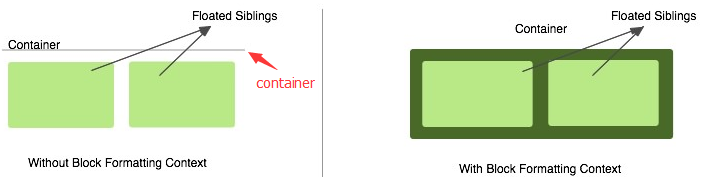
阻止浮动重叠
浮动元素A后面的非浮动元素B会表现的前面像没有浮动元素一样,跑到浮动元素下面去了。此时给B加一个BFC效果就可以避免这种情况,因为BFC产生的边界是不会与浮动元素重叠的,会隔开它们,demo:
如图: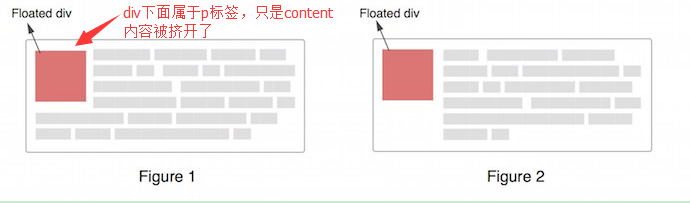
资料奉上:
understanding-block-formatting-contexts-in-css
CSS之BFC详解
how-does-the-css-block-formatting-context-work